
Conversions
The Conversions section (MAIN → Conversions menu) is the full log of what arrived from the affiliate network: every install, registration and deposit on its own row, with the payout, the time and a mark showing whether the event made it to Facebook. Where "Statistics" gives you the total ("338 deposits"), here you see what that total is made of and what happened to each conversion next.
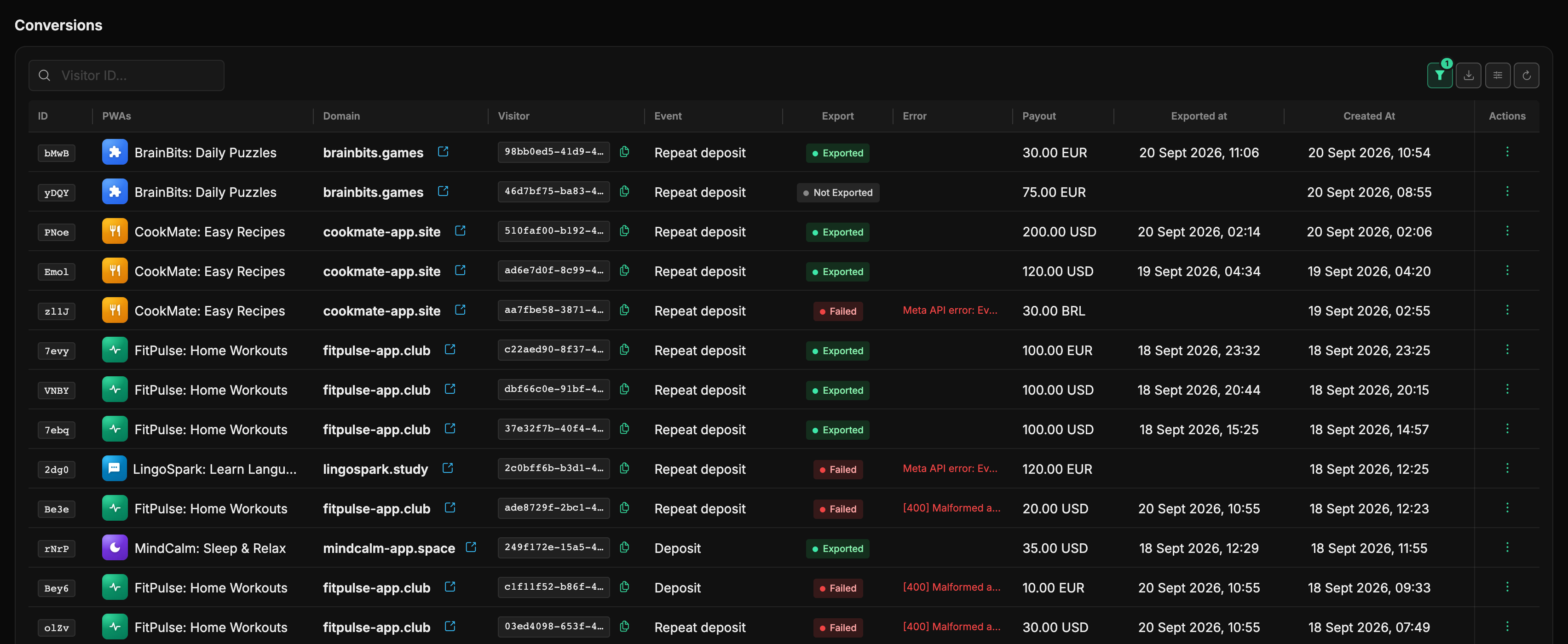
People usually come here with one of two questions: "did this particular conversion reach the ad account?" and "why didn't Facebook get yesterday's deposits?".
What's in the table
| Column | What it shows |
|---|---|
| ID | A short conversion identifier; clicking it opens the details. |
| PWAs | The app with its icon. |
| Domain | The domain the visitor landed on. |
| Visitor | The visitor identifier (pwa_visitor_id) the conversion was matched by. A copy button sits next to it. |
| Event | Install, Registration, Deposit, Repeat deposit, Page view or Open offer. |
| Export | The Facebook delivery status - see below. |
| Error | Facebook's answer when delivery failed: Meta API error: Event… or [400] Malformed access token, for instance. |
| Payout | The amount and currency from the postback. |
| Exported at | When the event went out to Facebook. Empty until it does. |
| Created At | When the conversion reached the panel. |
Export statuses
- Exported - Facebook accepted the event, and Exported at holds the time.
- Not exported - the event is still queued: delivery runs in the background once a minute, so the row usually changes status within a couple of minutes.
- Failed - Facebook refused it; the full reason is in the Error column and in the details. Most often it's an expired or wrong pixel token, less often an event that isn't set in the app's configuration.
- Open offer - a housekeeping event that is never sent to Facebook at all: the panel needs it to count the "Offer opens" funnel step.
Where the events go, and how
The panel delivers them itself - from the server, over the Conversions API, through the app's pixel if it has a token. Which Facebook event is sent (Lead, CompleteRegistration, Purchase and so on) is set in the PWA form on the Metrics tab - see "Metrics: pixels and tags".
Re-export
If a conversion failed for a temporary reason - an expired token, an error from Facebook - fix the cause (refresh the pixel token, say) and pick Re-export from the row's ⋮ menu. The panel clears the delivery mark and the error, and the next background run picks the event up again.
When a retry won't help
The item is unavailable for Open offer - that event is never sent to Facebook by design. And if the token is still broken, the retry returns the same error: fix the pixel first, then retry.
Filters and search
The Visitor ID... field searches the visitor identifier by substring - handy when the network complains about one specific customer. Everything else lives in the filter popover (the funnel button on the right):
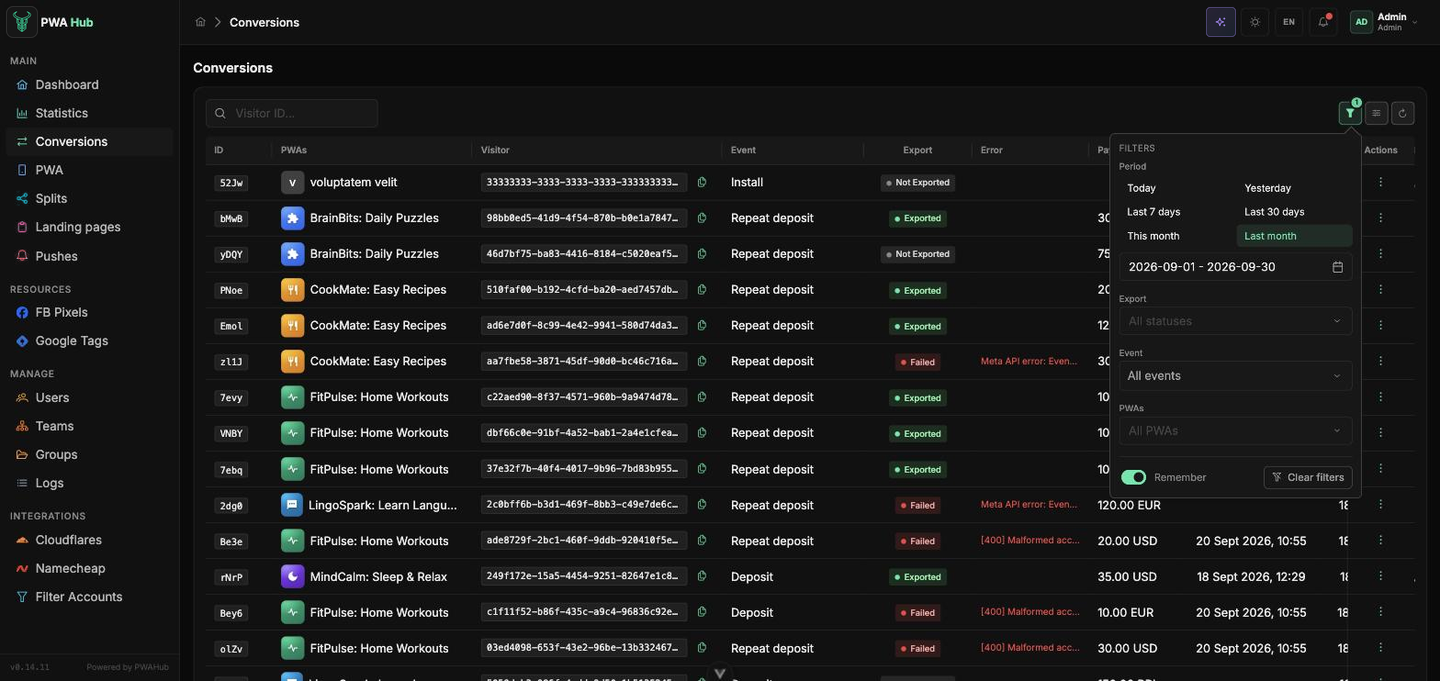
- Period - one-click presets (Today, Yesterday, Last 7 days, Last 30 days, This month, Last month) or your own dates in the field below.
- Export - exported only, failed only, not sent only.
- Event - one or several event types.
- PWAs - narrow down to the apps you need.
The Remember switch keeps the chosen filters for your next visit, and Clear filters returns the list to its original state. More about this popover and about column settings - in the "Interface" section.
Export to CSV
Next to the filter button sits a down-arrow button: it opens the Export popover with two reports, Conversions (CSV) and Visits (CSV). The file follows what the table shows right now: period, export status, event and app for conversions, period and app for visits. Set the filters, click the report you need - and the file downloads.
;as the separator, UTF-8 with a BOM: Excel opens the file into columns on a double-click, Google Sheets takes it via File → Import.- The period is at most a month - for half a year, run six exports.
- The data come from the analytics store and run up to 5 minutes behind the table.
- Visits carry every
sub_1…sub_20tag, the country, device, visit domain, IP and whether the visit was unique. Conversions carry the domain too.
Scripts get the same reports - see "Export" in the API section. The demo stand has no export button.
Conversion details
Details in the row menu opens everything the panel knows about the event and about the visit that led to it.
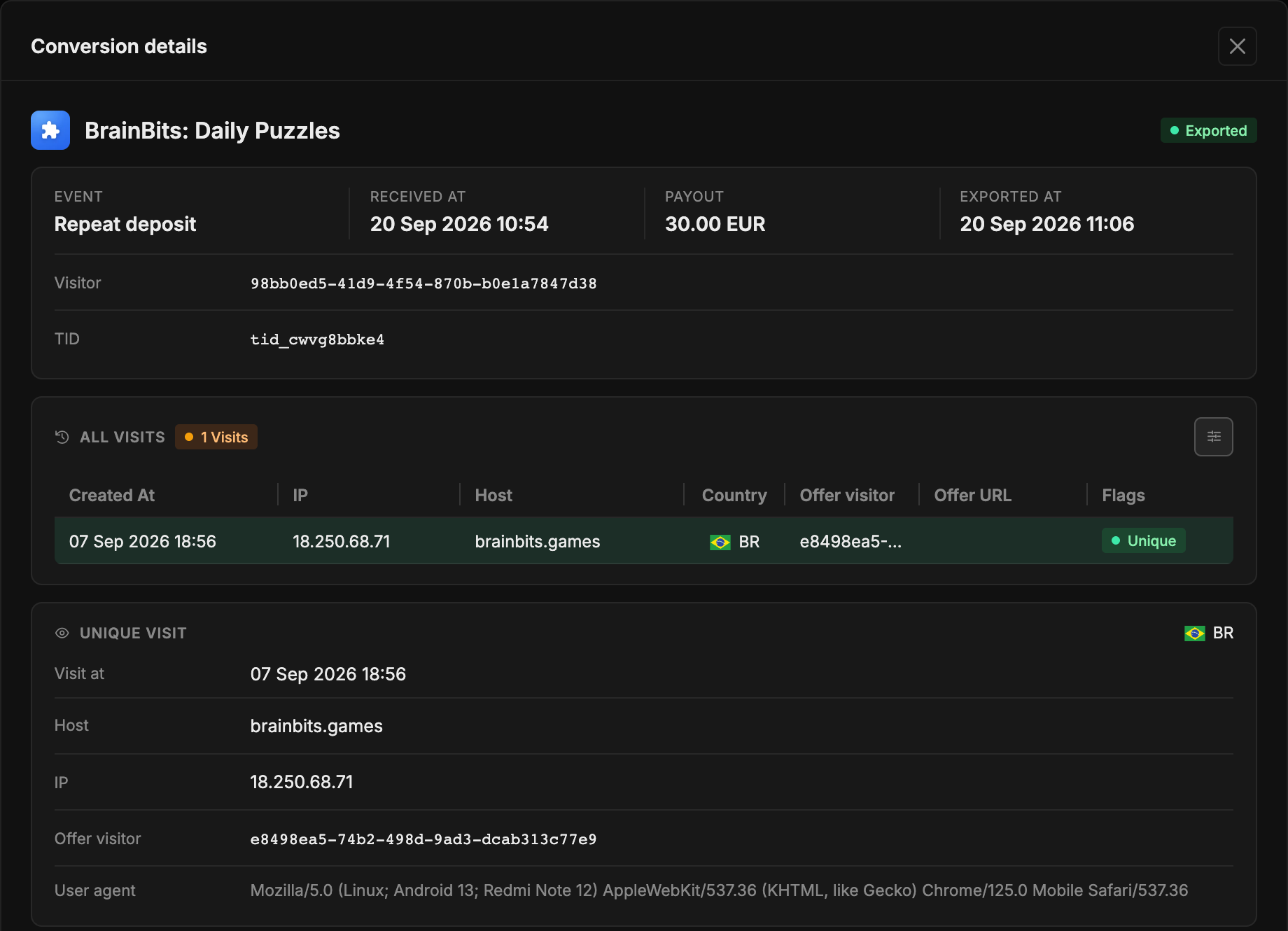
- The header holds the app and the export status, below it Event, Received at, Payout and Exported at, plus Visitor and TID (the transaction id from the postback).
- All visits - this visitor's visits: time, IP, host, country,
offer visitor, the offer URL and flags. The Unique flag marks the first visit, Matched marks the visit the conversion was credited to (the last visit on the flow before it arrived). - Unique visit - the same visit in full, including the
User agent. - Subs - the
sub_1…sub_20values the traffic came with. They show which campaign and which creative brought this deposit; the same tags are broken down in "Statistics".
When there's no visit
Sometimes a conversion arrives with no visit attached - the network sent a postback with a foreign or lost pwa_visitor_id, for example. The details then say No matching visit found: the event is stored and visible in the list, but there's nothing to tie it to traffic, and it won't reach Facebook.
Who sees what
As everywhere, the data follows access: you see conversions only for the apps you can reach, an administrator sees every conversion in the instance.
The conversion log is also available to scripts - see the API section "Conversions".